
aaf-Prep
From a tangled AAF to a session ready to mix — in minutes.
Hours of manual prep — reduced to a few clicks.
Closed beta is running — full version coming soon.
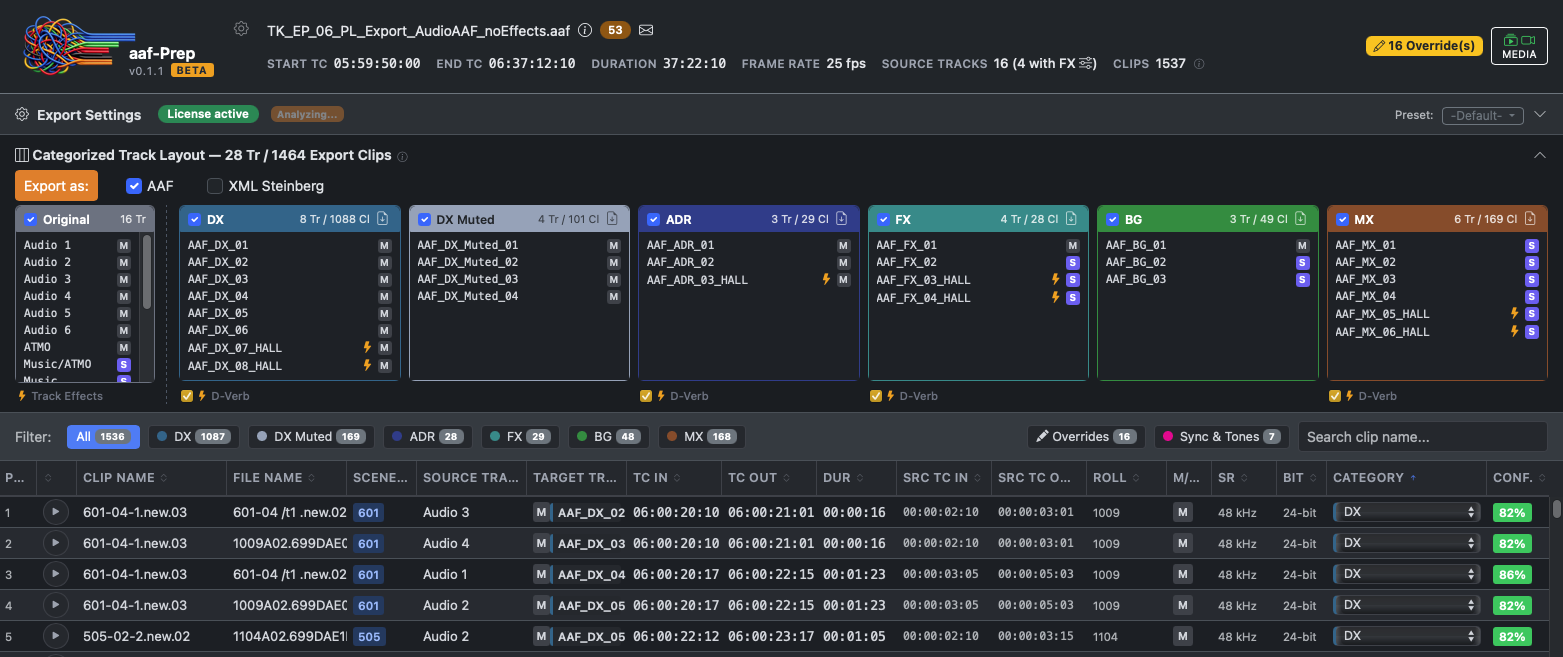
aaf-Prep reads AAF files from AVID Media Composer, Pro Tools and Nuendo. It auto-categorizes every clip into dialogue, ADR, effects, ambience, music — or any custom category you add — and writes a clean session out as AAF (Pro Tools / AVID) or Steinberg XML (Nuendo / Cubase).
Born from daily post-production practice, aaf-Prep can do much more:
Automatically detects what’s dialogue, effect, ambience or music.
A weighted multi-strategy system combining filename patterns, track position, track names and effects-chain analysis votes on every clip — like an expert panel. Detection typically catches the majority of clips cleanly across categories; ambiguous cases are flagged as “Unknown” in the review interface, where one click corrects them.
The app can only read what’s there, though: when an AAF arrives with generic, structureless filenames and no meaningful track layout, there’s little for the strategies to work with. A minimum of naming discipline in the source material is what lets the automatic detection do its job.
Export AAF and XML for Pro Tools and Nuendo.
Two export formats are built in: AAF (Pro Tools / AVID) and Steinberg Track Archive XML (Nuendo / Cubase). The categorized clips land in your target DAW on named tracks like “AAF_DX_01”, “AAF_FX_01” or “AAF_BG_01” — ready to mix. Crossfades, fades, pan and gain are preserved.
Track insert effects survive the export — D-Verb is automatically converted to RoomWorks.
Insert effects on tracks (reverbs, compressors, EQs) are copied verbatim during AAF export. When exporting to Nuendo/Cubase, the classic Pro-Tools-D-Verb is automatically mapped to RoomWorks VST3 — with production-calibrated decay curves, HF cut, pre-delay and input gain. Saves 30 to 60 minutes of manual plugin rebuilding per project. More plugins may follow.
Cue-Sheet and Cue-List export for music royalties and streamer deliveries.
At the press of a button, aaf-Prep exports a per-category cue list as TXT or XLSX — with an aggregate view (each clip name once, with usage count and cumulative running time) and a detail view (every single placement with timecode-in, -out and duration). The music list is automatically called “Cue-Sheet” — the industry convention for GEMA, BMI and ASCAP royalty accounting. Streamers like Netflix require FX and ambience cue lists as mandatory delivery assets; one click and you’re done.
AVID stereo splits are merged into proper stereo WAVs for Nuendo.
AVID likes to export stereo audio as two mono MXF files (DA01 = left, DA02 = right). Nuendo refuses that format — it needs a true interleaved stereo WAV. During the Steinberg export, aaf-Prep automatically merges them into an audio sub-folder and references them correctly in the XML. You won’t have to render a single file yourself.
Muted clips arrive cleanly in the target DAW — on their own tracks if you like.
Muted AVID clips (Selector with hidden content) are re-wrapped with the proper Pro-Tools flags so Pro Tools actually recognizes them as muted. Optionally (“Separate Muted DX”), all muted dialogue clips move to their own dedicated DX track — either in addition to the original track (Copy mode) or exclusively (Move mode). The mixer sees at a glance what the picture editor took out and can reactivate it if needed. Related: “Filter digital silence” additionally removes clips containing pure digital silence from the export tracks — cleaning up the mixing session without losing anything audible.
With audio player and video picture-in-picture.
Before exporting, a streamlined review interface opens up. You see every clip as a sortable, filterable table, audition them with a click, and can optionally load a video reference file — it jumps in sync with the clip’s timecode into a small picture-in-picture overlay. Your audio and video data never leave your machine — no cloud, no uploads, no tracking.
Detects scenes automatically from production sound clip names.
From clip names like “5-2-3/04” or “B0078 001/t1”, aaf-Prep extracts scene IDs and scene boundaries. From there it automatically figures out which FX clips are actually room tones or ambiences (they cover an entire scene) — those move into the ambience category instead of FX. Before export you see an overview and can confirm or reject the refinement with a click.
Reference tone and 2-POP land automatically on every export track.
Professional mixing needs sync references at the start of the timeline: a 1 kHz reference tone at -18 dBFS and a 2-POP sync click two seconds before program start. aaf-Prep finds these tones in the source AAF and copies them automatically onto the first clip of every category. Sync stays intact even after the tracks are reorganized.
Create your own categories like “Foley”, “VO” or “Score” — and re-categorize clips at any time.
The five built-in categories (DX, ADR, FX, BG and MX) don’t cover every workflow. Click “New category…” in the dropdown to create your own. They get their own export tracks (e. g. “AAF_Foley_01”), appear as filter buttons and behave on export exactly like the built-in categories — which can be renamed as well. Re-categorizing clips after the fact is part of the standard workflow — single clips via the dropdown, or several at once with Ctrl-/Shift-click. Clips with the same name on other tracks are highlighted, so corrections can be applied consistently across the timeline.
Production sound thinning — two production-sound tracks become one.
Production sound usually arrives on two channels: A1 (typically boom mix) and A2 (typically lavalier mix). aaf-Prep identifies pairs via position, source timecode and gain in a three-pass algorithm. Optionally, it reduces to the louder channel — your track count in the mix is cut in half. If you want to keep both channels, just leave thinning off. A proper assembly-track version is planned for a future release.
Beta testers wanted
The closed beta is open to a small group of working sound editors, mixers, video editors and conform editors. If you cut video or audio for picture daily and run into messy AAFs regularly, I’d love to have you on board.
What I’m looking for:
- You work with Pro Tools, Nuendo or AVID on a daily basis
- You’re on macOS (Apple Silicon or Intel)
- You’re willing to give constructive feedback on real-world AAFs
Before you apply: a quick look at the EULA and software privacy notice tells you what you're signing up for as a beta tester.
Write to me at beta@aaf-prep.com with your DAW, OS, and how often AAFs come through your workflow.
Interested in the launch?
Write to me: beta@aaf-prep.com
Installers are available for macOS (Apple Silicon and Intel). A Windows build is in final testing.